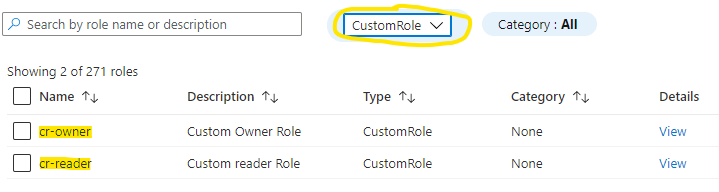
My recommendation for managing IAM in Azure starts with leveraging the built-in Role-Based Access Control (RBAC) Role Definitions. While built-in roles are convenient, they don’t always perfectly match every scenario. When this happens, it’s time to consider defining Custom Role Definitions to tailor a role specifically to your needs.
I’m not going to dive into the specifics of Azure RBAC role definitions or detail every action and notAction. The configuration will depend on your specific needs. Instead, I’ll focus on the creation and management lifecycle of a custom role definition.
There are several options for creating a custom role, including:
| Azure Portal | Azure PowerShell | Azure CLI | REST API |
Any of these options could work for what I was trying to do. Instead I choose the road of using an ARM template to standardize the creation and long term management of custom roles.
ARM Template
Any of these options could work for what I was aiming to achieve. However, I opted to use an ARM template to standardize the creation and long-term management of custom roles.
 "resources": [
        {
        "type": "Microsoft.Authorization/roleDefinitions",
        "apiVersion": "2018-07-01",
        "name": "[variables('roleDegGUID')]",
        "properties": {
            "roleName": "[variables('roleDefName')]",
            "description": "[parameters('roleDescription')]",
            "type": "customRole",
            "isCustom": true,
            "permissions": [
            {
                "actions": "[parameters('actions')]",
                "notActions": "[parameters('notActions')]"
            }
            ],
            "assignableScopes": [
                "[concat('providers/Microsoft.Management/managementGroups/', parameters('tenantRootID'))]"
            ]
        }
        }
    ],
Assignable Scope
The crucial question to answer is where to deploy the role definitions. They can be deployed at either the Management Group or Subscription level. The scope of deployment determines where in Azure the role definition will be available for assignment. I recommend deploying to the Root Management Group, making it available across the entire tenant without the need to define any potential future scope.
To deploy to the Root Management Group, you must ensure that you have the necessary permissions. By default, ‘Owner’ permissions to the Root Management Group are not assigned out of the box. The following PowerShell snippet will assign the required permissions:
    New-AzRoleAssignment -SignInName "[userId]" `
        -Scope "/"`
        -RoleDefinitionName "Owner"
Role Parameters
The secret sauce for this process is using an individual parameter file for each role definition. The key differences between these parameter files are the ‘roleName,’ ‘actions,’ and ‘notActions.’ Simply plug in the necessary actions to define the role according to your requirements.
    "actions": {
        "value": [
            "*/read"
        ]
    },
    "notActions": {
        "value": [
            "Microsoft.Network/networkInterfaces/delete",
            "Microsoft.Network/serviceEndpointPolicies/write",
            "Microsoft.Network/expressRouteCircuits/*",
            "microsoft.network/virtualnetworkgateways/*"
        ]
    }
In this example I am creating a custom role to enable global read access with a few restrictions for specific network services that where read access is not allowed. A full list of available Azure resource provider actions is documented on Microsoft Docs - Azure Resource Provider Operations.
Deployment
To simplify the deployment of multiple Role Definitions, I wrote a quick PowerShell script. This script iterates through all parameter files in the ‘role_definitions’ directory and executes a management group deployment for each one. The best part? It can be seamlessly integrated into your existing deployment automation tools or used as-is for quick and efficient setups.
[CmdletBinding()]
param (
    [Parameter(Mandatory=$false)][string]$parameterPath = ".\role_definitions\",
    [Parameter(Mandatory=$true)][string]$tenantRootMG,
    [Parameter(Mandatory=$false)][string]$azLocation = "centralus"
)

# Import custom role definition ARM parameter file(s)
$roleDefinitions = (Get-ChildItem -Path $parameterPath | Where-Object {$_.name -like "*parameters.json"}).fullname

$roleDefinitions | ForEach-Object {
    New-AzManagementGroupDeployment -ManagementGroupId $tenantRootMG `
        -Location $azLocation `
        -TemplateFile .\azCustomRole.azrm.json `
        -TemplateParameterFile $_ `
        -tenantRootID $tenantRootMG
}
This deployment will be done at the management group level using New-AzManagementGroupDeployment.
Once the deployment is completed, you can head over to the Azure Portal and check the custom RBAC roles to see the definitions.