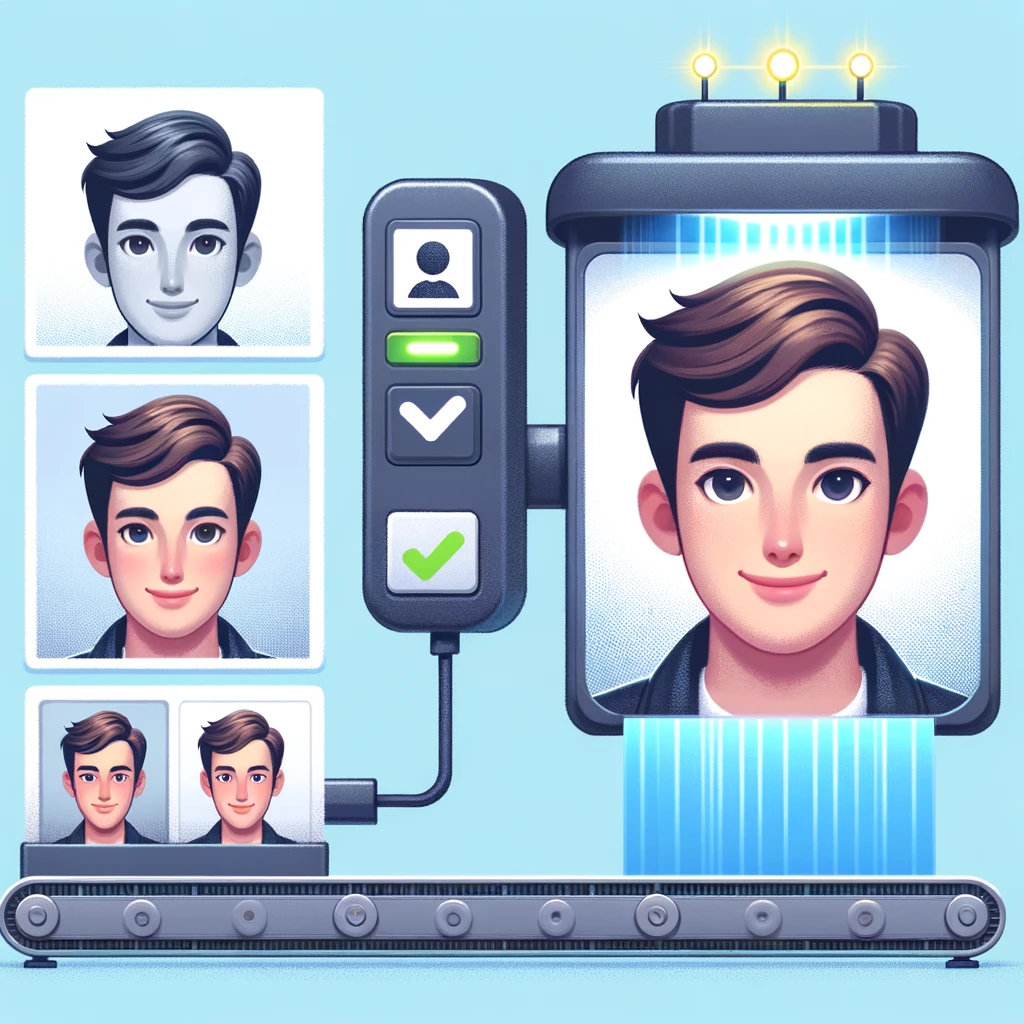
It’s passport renewal time… you know what that means. Either we get out of our chair and head over to the post office to have them take our picture, or try to do it ourselves and stress if we checked all the boxes. But what if there was a way to make this process easier? What if we could automate the task of taking our passport photo, ensuring that it meets the required standards, without having to leave our homes?
In true procrastinators’ fashion, I got a little carried away… In fact, I spent (maybe) more time building a solution than it would have taken to get a picture the more traditional way. But its ok I ended up creating a demo out of it!
In this article, I show how I used the Azure AI Face API in my demo repository, I’m excited to share how the Face API can be used to detect and analyze facial features, identify key attributes such as age and gender, occlusion, quality, etc. and how it can be used to automate tasks such as passport photo taking. We’ll also explore the demo structure and the two primary components that make up the application: the console Python app and the web page example.
This example/demo is far from perfect and you should check any output to make sure it conforms with all of the actual requirements.
Workflow
Simple flow chart describing the process once an image is submitted. The goal is the process to end with a properly size image and metadata to quickly determine if the picture will pass muster with the passport office.
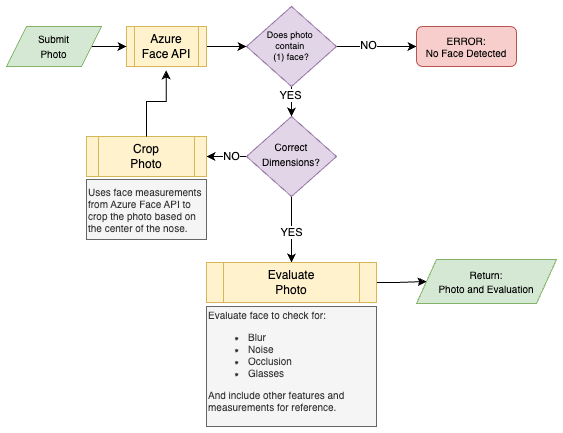
- Image is evaluate by the Azure Face API. Information and measurements on the face are returned.
- Does the image contain (1) face?
- NO: End. If the image contains 0 or >1 faces
- YES: Continue to image dimension
- Correct Dimensions? Does the image meet the size requirements based on Dept. of State passport photo requirements.
- NO: Using facial measurements from the Face API, center on the nose and crop to the required size. Restart processing the photo and get update measurements.
- YES: Continue to evaluation
- Evaluate the image to check for:
- Blur
- Noise
- Occlusions of the face
- Glasses
- Return the processed image and JSON document.
{
  "original_image_url": "https://<>.blob.core.windows.net/<>",
  "processed_image_url": "https://<>.blob.core.windows.net/<>",
  "id": "<ID>",
  "faceRectangle": {
    "top": 194,
    "left": 193,
    "width": 222,
    "height": 222
  },
  "faceLandmarks": {
    "pupilLeft": {
      "x": 253.4,
      "y": 255.7
    },
    "pupilRight": {
      "x": 353.0,
      "y": 255.1
    },
    "noseTip": {
      "x": 296.9,
      "y": 302.2
    },
  ... # There are loads more measurements I removed to make the example sit ont he page better
  },
  "faceAttributes": {
    "headPose": {
      "pitch": 12.8,
      "roll": 0.5,
      "yaw": -0.5
    },
    "glasses": "NoGlasses",
    "blur": {
      "blurLevel": "low",
      "value": 0.0
    },
    "exposure": {
      "exposureLevel": "goodExposure",
      "value": 0.66
    },
    "noise": {
      "noiseLevel": "low",
      "value": 0.03
    },
    "accessories": [],
    "occlusion": {
      "foreheadOccluded": false,
      "eyeOccluded": false,
      "mouthOccluded": false
    }
  }
}
What it looks like
Original Image
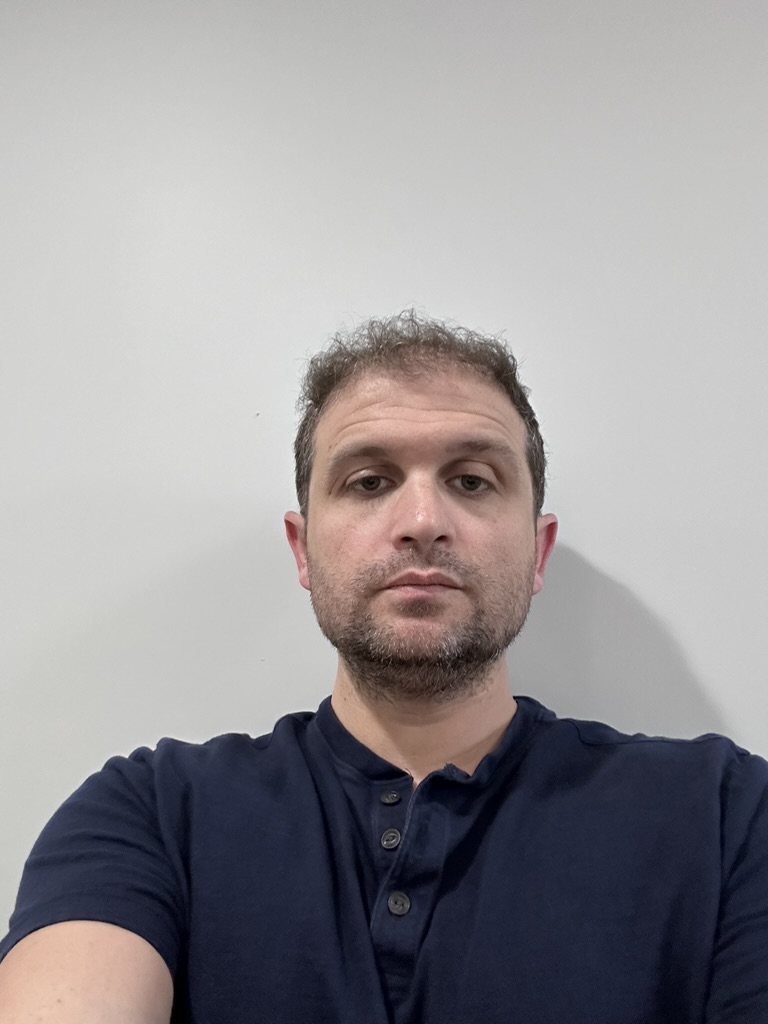
Pretty bad photo taken with my iPhone standing up against the wall outside my office.
Processed Image
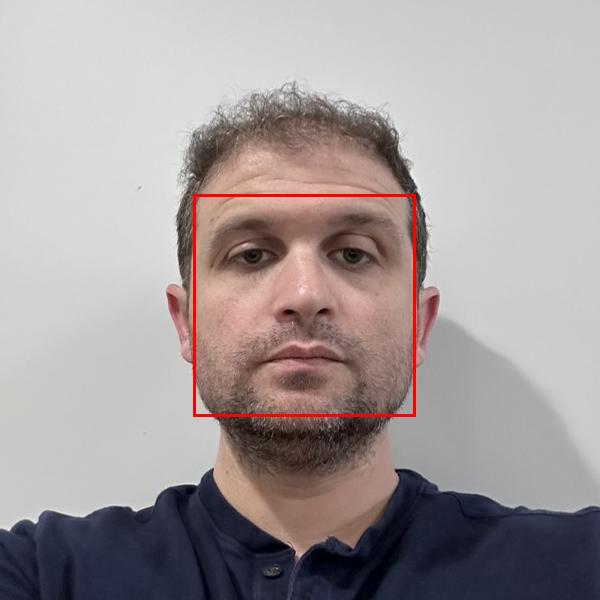
Post processed image with Azure Face API to get measurements and cropping down to the right size. The red box is reference for the measurements of my face provided by Azure Face API.
How it works
Below are the three pieces of code that I wrote to make it all work.
app.py
import os
import dotenv
import requests
from PIL import Image, ImageDraw
import json

from azfaceapi import AzureFaceAPI
from azstorage_operations import AzureBlobStorage, GenerateSASToken
from imageprocessor_operations import ImageProcessor

# Load environment variables from .env file
dotenv.load_dotenv()


if __name__ == "__main__":
  # Initialize API client
  api_client = AzureFaceAPI()
  original_image_url = ""
  image_url = os.getenv('PICTURE_URL')

  try:
    # Fetch face details from the image
    faces = api_client.detect_faces(image_url)

    # If more than one face is detected, return a message to the user
    if len(faces) > 1:
      print("More than one face detected. Please upload an image with only one face.")
      exit()

    #print(json.dumps(faces, indent=2))
  except requests.exceptions.RequestException as e:
    print(f"Request error: {e}")

  # Print image image dimensions
  image = Image.open(requests.get(image_url, stream=True).raw)
  print(f"Image dimensions: {image.size}")

  # If image is larger that 300x300 resize based on the face detected in the image
  if image.size[0] > 300 and image.size[1] > 300:
    original_image_url = image_url
    cropped_image = ImageProcessor().resize_image(image, faces)
    cropped_image.save("resized_image.jpg")

    # Upload cropped image to Azure Blob Storage and get SAS Token
    upload =  AzureBlobStorage().upload_image(cropped_image, faces[0]['faceId'])
    image_url = upload['image_url']

    # Re-detect faces in the cropped image
    faces = api_client.detect_faces(image_url)

  sas_token = GenerateSASToken().generate_sas_token(upload['image_url'])
  image_url_sas = {image_url} + "?" + sas_token
  image = Image.open(requests.get(image_url_sas, stream=True).raw)

  # Process image
  img = ImageProcessor().draw_faces(image, faces)
  img.save("detected_faces.jpg")


# Create JSON document with the original image URL and the processed image URL
  result = {
    "original_image_url": original_image_url,
    "processed_image_url": upload['image_url'],
    "id": faces[0]['faceId'],
    "faceRectangle": faces[0]['faceRectangle'],
    "faceLandmarks": faces[0]['faceLandmarks'],
    "faceAttributes": faces[0]['faceAttributes']
  }

  with open('result.json', 'w') as f:
    json.dump(result, f, indent=2)

  print("Faces have been marked and the image has been saved.")
  print("Results have been saved to result.json")
AzureFaceAPI
Image is stored in Azure Blob storage. A URL with SAS token is passed to this class which invokes the Azure Face API.
class AzureFaceAPI:
  def __init__(self):
    self.subscription_key = os.getenv('VISION_KEY')
    self.endpoint = os.getenv('VISION_ENDPOINT')
    self.face_api_url = f"{self.endpoint}/face/v1.0/detect"
    self.headers = {
      'Content-Type': 'application/json',
      'Ocp-Apim-Subscription-Key': self.subscription_key
    }
    self.params = {
      'returnFaceId': 'true',
      'returnFaceLandmarks': 'true',
      'returnFaceAttributes': 'noise,headPose,glasses,exposure,glasses,accessories,blur,occlusion',
      'detectionModel': 'detection_01',
      'recognitionModel': 'recognition_03'
    }

  def detect_faces(self, image_url):
    # REST API call to Azure Face API
    response = requests.post(
      self.face_api_url,
      headers=self.headers,
      params=self.params,
      json={"url": image_url}
    )

    response.raise_for_status()
    return response.json()
Image Processing
If the image doesn’t meet the size requirements. We take the position of the nose, to center the face and crop to the require size.
class ImageProcessor:
  def __init__(self):
    pass

  def resize_image(self, image, faces):
    # Find the coordinates of the tip of the nose
    nose_tip = None
    for face in faces:
      landmarks = face['faceLandmarks']
      nose_tip = (landmarks['noseTip']['x'], landmarks['noseTip']['y'])
      break

    # Calculate the crop dimensions
    crop_width = crop_height = 2 * image.info['dpi'][0]  # Assuming dpi is in pixels per inch
    crop_left = int(nose_tip[0] - crop_width / 2)
    crop_top = int(nose_tip[1] - crop_height / 2)
    crop_right = crop_left + crop_width
    crop_bottom = crop_top + crop_height

    # Crop the image
    cropped_image = image.crop((crop_left, crop_top, crop_right, crop_bottom))

    # Resize the cropped image to 2in by 2in
    resized_image = cropped_image.resize((2 * image.info['dpi'][0], 2 * image.info['dpi'][0]))

    return resized_image

  def draw_faces(self, image, faces):
    draw = ImageDraw.Draw(image)
    for face in faces:
      rect = face['faceRectangle']
      left, top, width, height = rect['left'], rect['top'], rect['width'], rect['height']
      right, bottom = left + width, top + height
      draw.rectangle([left, top, right, bottom], outline='red', width=3)
    return image