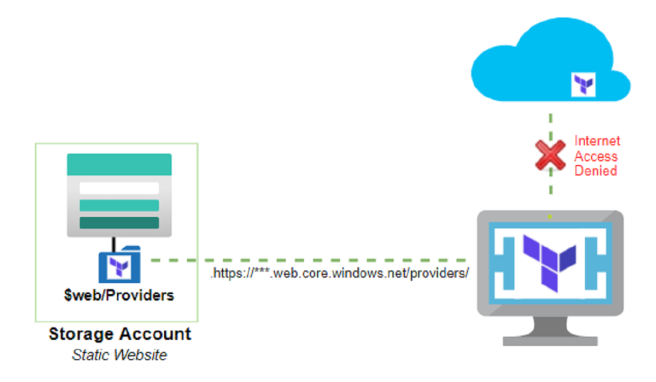
I have found myself working with Terraform templates in an environment where security has blocked all internet access from my build agent resources. This put me into a new situation of “How do I use terraform providers without access to the internet”? Reviewing the terraform documents for such a situation took me down a rat hole, with a few promising options.
Burried in Terraform documentation are options that fit the need. More specifically filesystem_mirror or network_mirror for distributing providers. I choose to use the network_mirror because it allows me to create a central distribution point for anyone on the network. The filesystem_mirror would require additional configuration and moving around of files.
Deploying and managing a virtual machine of full managed service is overkill in my opinion. Instead I turned my sights to hosting a Static Website in an Azure Storage Account.
network_mirror
The Terraform provider network mirror protocol implements an alternate installation source for Terraform providers, without needing access to the internet or the origin location. Which makes it a great option for a disconnected network scenario.
Couple of requirements to use the network_mirror:
- HTTPS web server to host repository and provider binaries.
- Terraform CLI configuration to reference and use network mirror.
Static Web Site
Building a virtual machine or spinning up a full managed service is overkill.
Deploying a static website in an Azure Storage Account is an easy process. It’s a standard storage account, with the additional option of enabling the static website option. When the static website option is enabled on the storage account a $web container is created to store static web items.
The basic configuration needed to host the network_mirror is simple. The only requirement is enabling the ‘static_website’ option, and setting the index_document to ‘index.json’. Terraform will look for this file first to find a manifest of providers and versions available in the mirror.
#Create Static Website Storage Account
resource "azurerm_storage_account" "storageAccount" {
    name                     = "*******"
    resource_group_name      = var.rgName
    location                 = var.env["region"]
    tags = var.tags

    account_tier             = "Standard"
    account_replication_type = "LRS"

    static_website {
      index_document = "index.json"
    }
}
network_mirror content
To populate the network_mirror with the correct syntax we need to ensure the correct directory structure and manifest files are present. Copy all of the file to the $web/providers container in the storage account to begin making them available.
The easiest way is using the Terraform CLI providers mirror command. Which will download the required providers and create the folders and manifests for you. However this command does require internet access to query and download the providers.
>terraform providers mirrorIf you are already in the internet-less environment everything can be done by hand. The Terraform Provider Network: network_mirror docs detail the requirements.
Directory structure
Folder structure is dependent on the original source of the provider. Terraform will follow this path to discover the providers. Create the manifest files and ZIP files containing the providers into this directory.
| Example Path | AzureRM provider path |
|---|---|
| %hostName%/%nameSpace%/%type%/ | registry.terraform.io / hashicorp / azurerm |
index.json
{
  "versions": {
    "2.71.0": {},
    "2.73.0": {}
  }
}
(version).json
{
  "archives": {
    "windows_amd64": {
      "url": "terraform-provider-azurerm_2.71.0_windows_amd64.zip"
    }
  }
}
CLI Configuration
terraform.rc
provider_installation {
    network_mirror {
        url = "https://*******.web.core.windows.net/providers/"
    }
}
When setting this up both in my lab, and for real I initially forgot to add the trailing forward slash (/) in the URL. Causing the Terraform CLI to fail when querying the network_mirror. {: .info}
Does it work?
After creating the Storage Account, copying provider files, and updating the terraform.rc configuration. We can test to see if everything worked. Running terraform init will download the required providers from the network_mirror. The best way I was able to confirm the provider is pulled from the mirror is the ‘unauthenticated’ tag. This is because the provider manifest I created did not include a hash for the provide version.
> terraform initThat is that. We now have a functional Terraform Provider network_mirror hosted on an Azure Storage Account Static Website. The mirror can be available as a central repository for Terraform providers across your organization without the need for network connectivity outside of Azure. Enjoy!